


VITA - Video Editor & Maker
4.26.58K Reviews
App Specs
- Version
- 302.0.18
- Updated On
- License
- Free
- Downloads
- 100,000,000+
- Developer
- SNOW Corporation
- Categories
- Video Players & Editors
- Platform
- Android, iOS
Screenshots
 Analysis by AppCompare
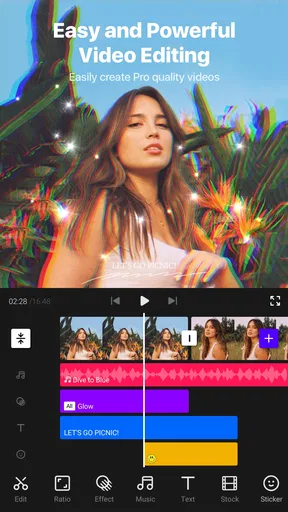
VITA - Video Editor & Maker is best understood as a quick route from phone footage to a polished, social-ready video—not a full replacement for a desktop editing setup. I like that it combines approachable templates with tools such as chroma key and multi-layer editing, so a newcomer can make something quickly while a more curious user has room to experiment. The trade-off is that a template-led workflow can feel restrictive when I want precise control over every cut and effect.
Where its quick workflow helps most
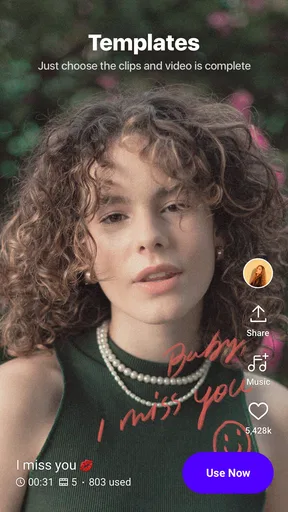
For an everyday example, imagine filming a few short clips during a day out and wanting to turn them into a recap before sharing them that evening. A template can give the video a visual direction without making me build every title and transition from scratch. I would still preview the result carefully: replacing the sample material is only the first step, and the pacing may need adjustment so the finished edit feels like my own rather than a template with different footage.
That balance is the app’s clearest practical strength. When I have a specific moment to share but little time to edit, having a starting structure is more useful than opening a blank timeline and making every stylistic decision myself. For a personal update, a short event recap, or a simple montage, the workflow is easier to approach than many editors that put a dense array of controls in front of a first-time user.
Small decisions that improve a finished video
I would choose the template only after deciding what the video is meant to do. A fast, energetic style may suit a highlights montage, while a clip meant to explain something benefits from calmer pacing and readable text. Swapping in footage without considering that purpose can leave a video looking busy even if each individual effect seems attractive.
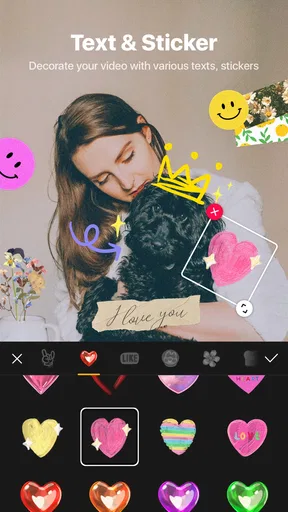
Text deserves a similar check. Captions and titles are easy to add, but I would keep each screen uncluttered and make sure the words remain legible over the image. A useful workflow is to assemble the clips first, watch the sequence once without polishing, and then add only the titles that help a viewer follow the story. That prevents decorative text from competing with the footage.
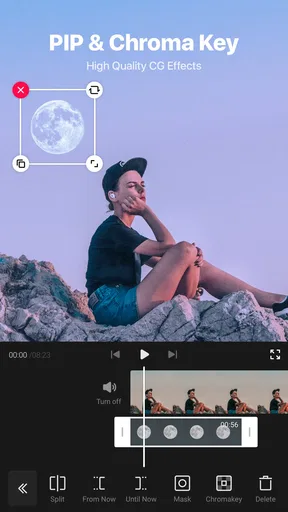
Multi-layer editing and chroma key also give VITA more creative range than a simple trim-and-filter tool. They can help when I want to combine elements or create a more deliberate visual treatment on a phone. Still, these tools reward patience: if a layered composition is the main point of a project, I would leave time to test it and revise it rather than assume that an advanced option will make the work effortless.
When another editor may suit you better
Compared with a basic phone editor, VITA offers a more guided, style-focused route, particularly when I want templates, effects, and text in one place. Compared with a traditional timeline editor, its appeal is speed and accessibility, not necessarily fine-grained control. Someone assembling a longer project with many exact edits, carefully managed audio, or a highly specific visual plan may prefer an editor built around detailed timeline work.
Worth Reading Before You Choose

EA SPORTS FC Mobile 26 Is a Bigger Football Game, but It Takes Time

Flipboard Shows What News Apps Must Do Beyond the Feed

Switching to Android Auto Means Rethinking Your Driving Routine

Google Calendar Makes a Crowded Week Easier to Manage

Ludo King Makes the Most of the Minutes Between Plans

Baby Panda World Brings Quick Play to Modern Phones, but Its Game Library Feels Busy
I would also think about the kind of result I need before starting. If I want a quick social clip, a guided template can reduce setup. If I am making a piece where every frame, transition, and sound cue must be carefully coordinated, a more manual workflow is likely to feel less limiting. VITA makes experimentation approachable, but it does not remove the creative choices behind a good edit.
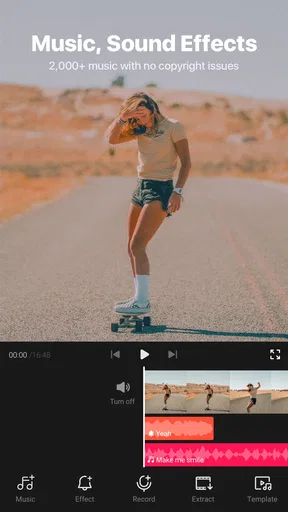
Music and sound effects can make a montage feel complete without sending me off to search for audio first. Even so, I would listen through the finished edit before sharing it: the soundtrack should support the footage, not overpower it. For a video where speech matters, I would pay particular attention to whether the music leaves the spoken parts clear. That last review is a simple step, but it can make the difference between a lively clip and a hard-to-follow one.
Who will get the most from it
I would recommend VITA to someone who wants to make short, attractive videos on a phone and values a gentle learning curve. It also makes sense for a casual creator who likes trying different looks before settling on one. The app is free, is rated for Everyone, and is made by SNOW Corporation; its 4.2 average across around 958,000 ratings and more than 100 million installs suggest that it has reached a broad audience, though popularity alone cannot tell me whether its workflow suits a particular project.
It is less compelling for a user who already has a precise editing routine and wants every control arranged around that process. A beginner may appreciate the templates, but someone who dislikes preset styles might find them less helpful and prefer starting from a blank timeline elsewhere. Likewise, if a project depends on detailed audio work or prolonged, highly organized editing, I would compare alternatives before committing to VITA as my main tool.
One practical question is whether it is approachable for a first edit: in my view, yes, because its layout and templates offer a starting point rather than requiring a technical setup. Another is whether it can grow with a user: its basic trimming and speed adjustments are easy to understand, while chroma key and layers offer room to try more involved ideas. The sensible expectation is a capable mobile editor for everyday creative work, not a promise that every advanced project will be equally comfortable on a phone.
It also helps to decide how much time to spend polishing. For a quick post, I would pick a template, replace the material, check the text and audio, and export. For a more personal video, I would treat the template as a draft and make changes until the timing and style fit the footage. That distinction keeps convenience from turning into sameness: the app can speed up the first pass, while the choices that make the result feel personal still come from me.
If you are deciding whether to try it, the key question is not whether VITA has the biggest set of controls; it is whether its balance of guidance and flexibility matches the videos you actually make. For casual social edits, I think that balance is appealing. For elaborate work that calls for exact, repeatable control, I would look for a more timeline-centered alternative and use VITA for lighter projects instead.
When I first opened VITA, I was greeted with a sleek interface that didn't scream “complicated.” It’s super user-friendly, which is a huge win for both newbies and seasoned editors. I loved how everything was laid out, making it easy to dive right into the action.
One of the standout features is the variety of templates available. Whether you’re crafting a snappy Instagram story or a longer YouTube video, there’s something for every occasion. The templates are not only visually appealing but also easy to customize. Just swap out the text and images, and you’re good to go!
Editing Tools Galore
The app comes packed with editing tools that cover all the basics and then some. You can trim, split, and adjust the speed of your clips with ease. But what truly impressed me were the advanced features that you don’t often find in mobile apps, like chroma key and multi-layer editing. It’s like having a mini Premiere Pro on your phone!
Another thing I found super handy was the library of music and sound effects. No need to scour the internet for royalty-free music. VITA’s got you covered, allowing you to add that perfect tune to your video without breaking a sweat.
Filters and Effects
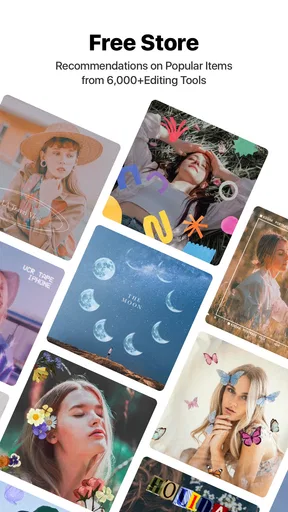
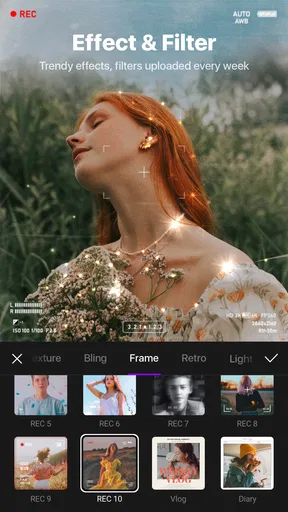
Creating visually stunning videos is a breeze with VITA’s extensive range of filters and effects. Whether you’re going for a vintage vibe or a modern, crisp look, there’s a filter for that. Plus, the app’s effects are top-notch, adding that extra flair to make your videos pop.
And let’s not forget about the text options. Adding captions, titles, and subtitles is straightforward, with plenty of fonts and styles to choose from. This is a lifesaver for making engaging content that’s both informative and entertaining.
Exporting and Sharing
Once your masterpiece is complete, exporting it is a cinch. You can choose your resolution, which is great for maintaining quality, especially if you’re planning to upload to platforms that support high-definition videos. Sharing directly to social media is also seamless, saving time and effort.
One thing that stood out to me was the app’s focus on quality. Even with high-resolution exports, the processing time was surprisingly fast. No more waiting around, tapping your foot impatiently.
The Final Verdict
In a nutshell, VITA - Video Editor & Maker is a stellar app for anyone looking to create professional-grade videos on the go. It combines ease of use with advanced features, giving you the best of both worlds. Whether you’re a beginner or a seasoned pro, this app has something to offer. So why not give it a whirl? You might just find it’s the missing piece in your content creation toolkit.
VITA is a video editing app in the Video Players & Editors category, and its current version is 302.0.18 for Android 8.0 and later. I would keep the operating-system requirement in mind before planning a project around it, especially if I use an older phone. Since editing involves working with clips, effects, and exports, I’d also start with a small test project on a device that feels comfortable for previewing and making adjustments.
One useful way to avoid wasted effort is to make a rough cut before adding filters or decorative effects. Trim and arrange the footage first, then watch the sequence from beginning to end. If the story works without visual polish, effects can enhance it; if it does not, a filter will not fix the underlying pacing. This approach is especially helpful when a template makes it tempting to style the video before deciding which moments belong in it.
Before exporting, I would check the final video in the same orientation and context where I expect people to watch it. A title that looks clear in the editor can feel crowded once the footage is viewed on a phone screen, and a soundtrack that seems balanced while editing may distract from speech during playback. Taking one final viewing pass is more reliable than assuming that a quick export is automatically ready to post.
Ready to start crafting your video masterpieces? Download VITA and let your creativity run wild!
Pros
- User-friendly interface for beginners.
- Wide range of editing templates.
- High-quality export options.
- Regular updates with new features.
- Supports multi-layer editing.
Cons
- Limited advanced editing tools.
- In-app purchases can be pricey.
- Requires stable internet for cloud saves.
- Occasional ads can be intrusive.
- Limited music selection for free users.
FAQs for VITA - Video Editor & Maker
What features does VITA offer for video editing?
VITA provides a comprehensive suite of tools for video editing, including trimming, splitting, and merging clips. It also offers advanced features like filters, effects, and text overlays. Users can access a library of royalty-free music and make use of speed controls and transitions to enhance their videos.
Is VITA suitable for beginners in video editing?
Yes, VITA is designed with user-friendliness in mind, making it ideal for beginners. The intuitive interface guides users through the editing process with easy-to-use tools and templates. Tutorials and tips are also available within the app to help new users navigate its features effectively.
Does VITA support 4K video editing and export?
VITA supports editing and exporting in 4K resolution, ensuring that users can create high-quality videos. This feature is particularly beneficial for content creators looking to maintain professional standards in their video projects. The app is optimized to handle large files without compromising performance.
Are there in-app purchases or subscriptions in VITA?
While VITA is free to download and use, it offers in-app purchases for additional features and effects. These may include premium filters, effects, and exclusive content. Users can choose to subscribe for a monthly or yearly fee to unlock all premium features and remove watermarks.
What devices are compatible with VITA?
VITA is available for both Android and iOS devices. It requires Android version 6.0 or higher and iOS version 12.0 or later. The app is optimized for both smartphones and tablets, providing a versatile editing experience across different platforms. Users should ensure their device meets these requirements for optimal performance.


